Why learn web dev skills in 2026

… when AI can do it instead

This fall I have a group of student interns helping me to launch a new website. The students completed a “Digital Bootcamp” where they learned web design and marketing skills, and the goal of the internship is to put things into action. I’m asking them to build the static website from scratch so they will learn web dev skills. I was telling a friend about this and he asked “What is the point of learning web dev skills given that GenAI can build websites better than humans nowadays?” I thought about it some, and now you’ll hear about it.

TL;DR: Web developer knowledge and skills are still useful so that you’ll know what to prompt for.


Context and scope

To be clear about what we’re talking about in this blog post, let me describe the context and scope of the project:

  • The final deliverable is a book homepage for the upcoming stats book, similar to the existing sales pages minireference.com and noBSmath.com.
  • The deliverable is a static site that consists of HTML, CSS, and image assets. There won’t be any database backend or fancy JavaScript running on the page. No shopping card functionality is needed, since we just link to external sites.
  • I’m looking for basic design—not something out of this world. The homepage serves as a container for the marketing message for the book leading up to the BUY NOW links. The homepage also needs to surface the numerous free resources like notebooks, tutorials, video lessons, book excerpts, and blog posts about statistics [1,2,3,4,5,6] that accompany the book.

Given the limited scope and simple deliverable, I thought this would be a perfect project for interns. It’s a real-world project I will actually put into production when I launch the book, but also small enough that it can be done in a few weeks. The cool part is students will get exposed to all the steps of building a website.


Steps to build a website

Creating the sales web page from scratch involves the following steps:

  1. Product research: learn about the product you’re selling, which is a book in this case. What is covered in the book? What is the target audience. What should the sales pitch be?
  2. Competitive research: look at other book websites to get ideas for the web design and marketing messaging.
  3. Writing webcopy: prepare the marketing messaging for the book. This part can be done in a ordinary word document.
  4. Design: design of the website to determine how the information will be presented, the supporting visuals, typography, and sequence of sections.
  5. Design implementation (HTML + CSS): this is the part where you convert the design into actual HTML, CSS, and image assets. For a static site this means creating an index.html file, the associated CSS stylesheet, and image assets.
  6. Deployment: make the index.html and homepage assets available on the internet.


AI believer’s claims

Let’s state clearly what my friend was saying when he said “GenAI can build websites better than humans.” This is not an isolated opinion, but a widespread belief shared by many people who identify as AI evangelists (a.k.a. AI boosters, AI maximalists, etc.):

  • AI can write the marketing copy.
  • AI can choose how to organize the information in different sections of the page.
  • AI can design each section of the page.
  • AI can generate the necessary image assets.

Starting from such optimistic ideas about the capabilities of GenAI tools certainly puts into question if humans need to be involved in the six steps of building a website. By extension, we have to wonder if learning web dev skills in 2026 is necessary.

In the remainder of this blog post I’m going to make the case why web dev skills are still important.


Marketing skills

The first three steps of building a website are all about marketing, and involve very little writing of code. If you think GenAI writes better marketing copy than you, then you have a big problem!


Understanding the web

Building a website is greatly facilitated if you have mechanical sympathy for how the web works. What is a web server? What is a web client? What is an IP address? What is a DNS record? What is TCP/IP? What is a URL? You don’t need to know these details to use a website, but it helps a lot to know a little bit of how things work under the hood so that you’ll know what is possible.

Building websites manually (without use of GenAI) forces you to learn about a thing or two about how websites work. This knowledge is a foundation for understanding the wider tech context of the website you’re building. We can subdivide that into the following subfields.

Capabilities of the web platform

It’s good to know what the web can do out of the box. Using basic HTML markup and CSS stylesheets, you can produce sites with very different looks. It is also possible to implement various interactions and interfaces using JavaScript. These days, many popular applications are built using web tools. The web platform is very powerful, but it has certain limitations. You need to know what these are to know when you might need to build a native application.

Understand browser security model

Given this is a simple homepage, security is not going to be a big concern. It’s still good to know that the server uses HTTPS to avoid users getting the “This site is not secure” warning and incurring SEO penalties.

Knowing what can go wrong

This technological understanding is particularly helpful when things don’t work as expected. When trying to load a page on a remote server and you see nothing, there are many things you can check

  • Is it a DNS issue? Check using nslookup or dig.
  • Is it a connectivity issue? Try ping-ing the server.
  • Is it a firewall issue? See if HTTP port 80 or HTTPS port 443 are accessible.
  • Is the web server down? Connect to the host and check if the web server is running and the logs in /var/log/.
  • For servers that have a backend, you can also check if the backend is running and if the connection to database is OK.

Basically there are all kinds of issues you might run into, and if you use a ready-made solution that you didn’t set up yourself, you won’t know what could have gone wrong.


Knowing how browsers work

Okay, let’ say we have established connectivity between a web server and web client like the Firefox browser. What happens next? How does the browser actually render the page? It’s equality to know how things work on the client side, at least at the conceptual level, but ideally also at the technical level. Here are some things to consider.

Anatomy of a webpage

It’s essential to know at least the vocabulary for describing the parts of the web page.

  • HTML source file (usually index.html)
    • HTML elements: html, head, body, headings, paragraphs
    • Container elements div, span, header, article, section, footer
    • External resources (stylesheets, scripts, images)
  • CSS stylesheet
    • selectors: element names, classes, and ids
    • variables
    • grid
  • Images
    • Image formats
    • Image
  • scripts
    • JavaScript coding
    • build scripts and minificaiton

Learning HTML and CSS makes you familiar with all these webpage components, since you have to add them piece by piece to make the page render as you want. In contrast, if you use a ready-made solution from GenAI you don’t learn how the parts work. Which part of the output you see on the screen was created by which element of markup and styling.

They key point here is that knowing the “anatomy” of a webpage is super useful when prompting GenAI for changes or fixes to an existing page. Let’s face it, we all know GenAI rarely produces the exact output you desired on the first trial (one-shotting), so it’s super helpful to know the web dev vocabulary to prompt AI to make changes to the page.

Web performance issues

Don’t use a 3MB image as the background. If you don’t know how to optimize them for use on the web, then the website you create will be very heavy and take long to load. That’s actually an area GenAI could be useful: asking it to process images and compress them to make for faster transfers, but you have to know to ask for it.

Responsive design

The same webpage needs to look good on a desktop computer with a wide screen and on mobile. Navigation menus, images, section layouts must all be designed with different viewpoints in mind, and tested too. This is always tricky business and requires thinking about what you want to happen at each screen size.

SEO

This takes us back to the initial marketing research: what wording to choose to make the webpage come up in search results. What additional considerations to take if you want the page to turn up in GenAI responses.


Develop debugging skills

Perhaps the most important skill one needs to have to succeed as a web developer is grit: not quitting in the face of errors. The fact is, no matter what you do, the result will not always turn out exactly as you plan on the first try. This is where you learn to use dev tools in Firefox and Chrome to look at the HTML, computed styles, and generally try to figure out what’s gone wrong. This can be frustrating and very discouraging at first, since you’ll face more failures than successes, but things get better over time and you learn to know how things work.

A tight feedback loop is essential for debugging. Ideally you should be making all changes to HTML and CSS in a live-reloading server that watches for changes and automatically refreshes the browser page. In contrast, if you have to wait for seconds to get feedback from a LLM about the fix is too long and even more discouraging. Better try to fix issues yourself than ask AI to do it!


Learn about deployment

Think servers and command line stuff. No matter how good your agents are at writing the code,  at some point you’ll have to deploy your web application somewhere. Do you want to rely on simplified hosting solutions that could go away tomorrow, or do you want to self-host on a server under your control? The second option requires that you learn a thing or two about how servers work. Not a lot, but enough to install a web server on a rented server and set up an SSL certificate on it.


Skills that are less relevant in 2026

Some skills that were traditionally part of the “web dev” toolkit are perhaps less important these days.

  • Learning all-in-one frameworks like bootstrap. Thanks to modern CSS features like variables and the grid layout, using a framework like bootstrap is no longer necessary.


So what can GenAI be used for?

GenAI can be very useful as a tutor and advisor when doing web dev work. Also as research tool to suggest how to approach different tasks. Here are some uses I would recommend:

  • Build a list of competitors’ websites.
  • Given a sketch ask to generate minimal HTML and CSS layout you can use as a starting point for further manual edits.
  • Ask “How do I do task X?” and let ChatGPT explain to you conceptually and with code examples that you can then apply in the code and interactively check that they work.
  • Upload a screenshot and ask what is wrong with some layout—how to fix it. Again—don’t let the AI touch your code—ask it for the information that you then apply yourself.

Basically, you can let the ChatGPT do the boring work, but you still stay in charge of putting everything together.
 

Making hypothesis testing make sense

These past months, I’ve been running a Reading Group for the No Bullshit Guide to Statistics and this week we finally reached Section 3.4 that explains hypothesis testing procedures like the one-sample $t$-test. Hypothesis testing is a notoriously complicated topic. Without a doubt, it is the most difficult to understand topic in the STATS 101 curriculum.

I just finished preparing the exercises for Section 3.4 and I’m filled with pride for what I managed to accomplish. I can honestly ask readers to solve these exercises knowing that they have all the necessary prerequisite knowledge and experience to answer them. After multiple rewrites and endless editing, the text has finally reached the level that I aspire to in all my writing: it explains from first principles, in full detail, using only concepts that readers understand.

Context

The first draft of the book covered the same topic using the “standard” narrative: introducing the $t$ test statistic, using the standard Student $t$-distribution to compute the $p$-value, then making a decision to reject $H_0$ or not by comparing the $p$-value to a cutoff value $\alpha$ (usually $\alpha=0.05$). I re-read and edited this initial draft many times. My main skill as an educator is my ability simulate what readers can “handle” in terms of complexity, and no matter how smoothly I explained things, I couldn’t get myself to believe that readers will be able to follow all the steps. Too many new concepts; too many moving parts; too much math; and too much procedural complexity. I wanted the No Bullshit Guide to Statistics to be different, but instead I had reproduced the same impenetrable explanations as in the hundreds of other statistics textbooks.


The problem with the standard approach

Understanding the hypothesis testing procedure requires the following pieces:

  • Knowing how to load data samples (e.g. using pandas)
  • Knowing how to compute sample statistics like the sample mean $\overline{\mathbf{x}}$ and the sample standard deviation $s_{\mathbf{x}}$.
  • Knowing the basics of probability theory (random variables, probability distributions, expectations, probability models and their parameters).
  • Knowing about location-scale probability model families and the location-scale transform $\frac{X – \mu_X}{\sigma_X}$ that allows us to “standardize” any random variable $X$ within that family (e.g. any normal random variable $N\sim\mathcal{N}(\mu,\sigma)$ can be transformed to the standard normal $\frac{N-\mu}{\sigma} = Z \sim \mathcal{N}(0,1)$, which has mean 0 and standard deviation 1).
  • Knowing that probability distributions can be used to model data distributions.
  • Knowing about the sampling distribution of the mean $f_{\overline{\mathbf{X}}}$, which describes the variability of the sample means we might observe from i.i.d. random samples $\textbf{X} =(X_1,X_2,\ldots,X_n)$ from a the population $X$.
  • Knowing about the central limit theorem (a math formula that describes the sampling distribution of the mean).
  • Knowing the formula for the standard error of the mean $\mathbf{se}_{\overline{\mathbf{x}}} = \frac{\sigma_X}{\sqrt{n}}$, which is the standard deviation of the sampling distribution of the mean $f_{\overline{\mathbf{X}}}$.
  • Knowing about the plug-in principle that allows us to “plug in” the sample standard deviation $s_{\mathbf{x}}$ into the place where the population standard deviation $\sigma_X$ goes, to obtain the estimated standard error of the mean $\widehat{\mathbf{se}}_{\overline{\mathbf{x}}} = \frac{s_{\mathbf{x}}}{\sqrt{n}}$.
  • Knowing about Student’s $t$-distribution and its use for probability calculations based on the estimated standard error $\widehat{\mathbf{se}}_{\overline{\mathbf{x}}}$ when the true standard error $\mathbf{se}_{\overline{\mathbf{x}}}$ is unknown.
  • Knowing about pivotal transformations (a type of location-scale transform) like $T = \frac{\overline{\mathbf{X}} – \mu}{ \widehat{\mathbf{se}}_{\overline{\mathbf{x}}} }$, which allows us to do calculations with the sampling distribution of the mean in terms of the standard Student $t$-distributions $\mathcal{T}(\nu)$ with mean 0 and scale 1.
  • Knowing about the logic of hypothesis testing:
    • Formulating statistical hypotheses $H_0$ and $H_A$.
    • Computing the $t$-statistic from the sample $t = \frac{\overline{\mathbf{x}} – \mu_X}{ \widehat{\mathbf{se}}_{\overline{\mathbf{x}}} }$.
    • Choosing the appropriate reference distribution to use as the sampling distribution of the test statistic under the null hypothesis (spoiler: it’s the standard $t$-distribution with $\nu = n-1$ degrees of freedom).
    • Computing the $p$-value of the observed test statistic (or a more extreme value) under the sampling distribution under $H_0$.

That’s a tall order! Asking readers to take in all these concepts at once is akin to trying to fit an entire tree into your fireplace. It simply ain’t gonna fit! The only outcome you can expect if you try to fit an entire tree—with branches, leaves, and all—into your fireplace is to set your house on fire!

No wonder most statistics students end up confused by their first contact with hypothesis testing and resort to memorizing procedures and formulas. Most students in science, social science, business, etc. leave their first STATS 101 course without a proper understanding of the logic of statistical inference.

I wasn’t about to quit though! No way I’m going to let the future generations of students down. Something must be done!


My solution

I picked up a small axe and relentlessly chopped away at the complexity. I “factored out”  all the prerequisite concepts and frontloaded their explanations in previous chapters. The overall plan was to build up the reader’s understanding of all the moving parts before they get to Section 3.4.

  • Section 1.2 introduces practical data manipulation skills like load datasets using pandas.
  • Section 1.3 teaches readers how to compute descriptive statistics like the sample mean $\overline{\mathbf{x}}$ and the sample standard deviation $s_{\mathbf{x}}$.
  • Student’s $t$-distribution is introduced as probability model in Section 2.6.
  • Sampling distributions and the central limit theorem are first introduced in Section 2.8 as a probability concept.
  • Sampling distributions are then covered again in Section 3.1 in the context of statistical inference.
  • The standard error is also explained in Section 3.1 as well as the estimate for the standard error computed from the sample standard deviation using the plug-in principle
  • Student’s $t$-distribution then appears again in Section 3.1 as an approximate model for the sampling distribution of the mean when using estimated standard error $\widehat{\mathbf{se}}_{\overline{\mathbf{x}}}$ instead of the true standard error $\mathbf{se}_{\overline{\mathbf{x}}}$.
  • The logic of hypothesis testing is presented in Section 3.3 using simulation methods. This allows me to explain the key concepts like:
    • Statistical hypotheses $H_0$ (no effect) and $H_A$ (some effect exists).
    • Test statistic like the sample mean (presented as alternative uses of the descriptive statistics readers learned in Section 3.1).
    • Obtaining the sampling distribution of the test statistic under the null hypothesis using simulation.
    • Computing the $p$-value of the observed test statistic (or a more extreme value) by computing the proportion of the simulated test statistics under $H_0$ that are equal to or more extreme than the observed test statistic.

The overall complexity readers are exposed to is the same in my book as in other books, but by introducing the “moving parts” step by step, the complexity becomes manageable. In practice, this means 400 pages of prerequisites (Part 1 of the book), and a long Section 3.1 where sampling distributions are discussed at length. It’s a lot of work to get though all these prerequisites, but as samurai saying goes, when you cry during training, you can laugh on the battlefield. My aim was to provide a similar experience: build up the reader’s skills, so that by the time they get to the “battlefield” in Section 3.4, they feel totally at ease.

Did I succeed with my aim? I guess it’s not for me to say. I’ll have to wait until next week to get the feedback from readers, and to see if they managed to solve the exercises!

The calculus tutorial just shipped!

I just finished working on a calculus tutorial that introduces key ideas like limits, derivatives, and integrals in a condensed manner. I’m very proud of how it came out, since it includes the standard definitions and math formulas, but also explains derivatives and integrals as Python code. This tutorial as a free download so that even people who don’t own the No Bullshit Guide to Math & Physics textbook can learn the key ideas of calculus: just print this bad boy at home or on the office printer.

Check out the printable PDF here:
https://minireference.com/static/tutorials/calculus_tutorial.pdf [2MB, 25pp]
and run the associated computational notebook here: https://bit.ly/calctut3.

You can also watch this video trailer that explains what’s in the tutorial:

Read the rest of the blog post to learn about my motivation for writing this tutorial and where it fits in the wider Minireference Co. content marketing strategy for 2026.


Continue reading “The calculus tutorial just shipped!” →

No Bullshit Guide to Statistics prerelease

After seven years in the works, I’m happy to report that the No Bullshit Guide to Statistics is finally done and available as a digital download from Gumroad: gum.co/noBSstats. The book ended up being 1100 pages long and so I had to split it into two parts: Part 1 covers prerequisites (DATA and PROB), then Part 2 covers statistical inference topics: classical (frequentist) statistics, linear models, and Bayesian statistics.

The prerelease price is US\$39, which is a 42% discount for all the true fans who read the company blog post. See below for the table of contents, links to preview PDFs, and an explanation about why the book took so long to ship.

TL;DR: Ivan ventures into the statistics mountains, faces many uphills, but is not a quitter, so comes out alive, bringing back a condensed guide to statistical inference topics (Part 2; 656 pages) and prerequisites (Part 1; 433 pages). See trailer video here:


Continue reading “No Bullshit Guide to Statistics prerelease” →

Sales pitch about why you should learn statistics

In another tab, I’m writing the announcement blog post for the No Bullshit Guide to Statistics. I spent the past seven years teaching myself statistics at the graduate level so that I can explain undergraduate statistics topics in a concise manner, with the focus on the most important topics. Now you can benefit from this experience.

I understand some of you might not be too hot about the idea of reading 1100 pages of dense text, math formulas, and code examples, so I prepared a “sales pitch” that explains why statistics is important, and why reading the No Bullshit Guide to Statistics is the best way to learn statistics.

Continue reading “Sales pitch about why you should learn statistics” →

Python coding skills for statistic

Learning statistics is greatly facilitated by using a computational platform for doing statistics calculations and visualizations. You can do basic stats calculations using pen-and-paper for small datasets, but you’ll need a computer to help you with larger datasets. Common computational platforms for doing statistics include JASP, jamovi, SPSS, R, and Python, among many others. You can even do statistics calculations using spreadsheet software like Excel, LibreOffice calc, or Google Sheets. I believe using Python is the best computational platform for learning statistics. Specifically, an interactive notebook environment like JupyterLab provides the best-in-class tools for data visualizations and probability calculations.

But what about learners who are not familiar with Python? Should we abandon non-tech learners and say they can’t learn statistics because they don’t know how to use Python? Naaaah, we ain’t having none of that! Instead, my plan is to bring non-technical learners up to speed on Python by teaching them the Python basics that they need to use for statistics. Anyone can learn Python, it’s really not a big deal. I hope to convince you of this fact in this blog post, which is intended as a Python crash-course for the absolute beginner.

Continue reading “Python coding skills for statistic” →

What stats do people want to learn?

If I’ve learned anything about the startup world, it is that you have to listen to your customers, which in my case are the readers of the No Bullshit Guide textbooks. With this principle in mind, I sent out a survey to readers interested in the upcoming statistics requesting feedback on the general direction for the book, based on the stats curriculum and book proposal blog posts, the concept map, and the detailed book outline.

I’ll summarize the results of the survey below (140+ respondents) and comment on some of the readers’ suggestions and advice. The survey is still open in case you want to add your feedback, or feel free to send me an email directly. My email is ivan at this domain.

Continue reading “What stats do people want to learn?” →

Learning loops

I was talking with friends recently about an interesting phenomenon that all self-taught programmers have observed, which we ended up calling “learning loops.” A learning loop is a process in which learners are motivated to advance their knowledge thanks to the positive feedback on their performance.

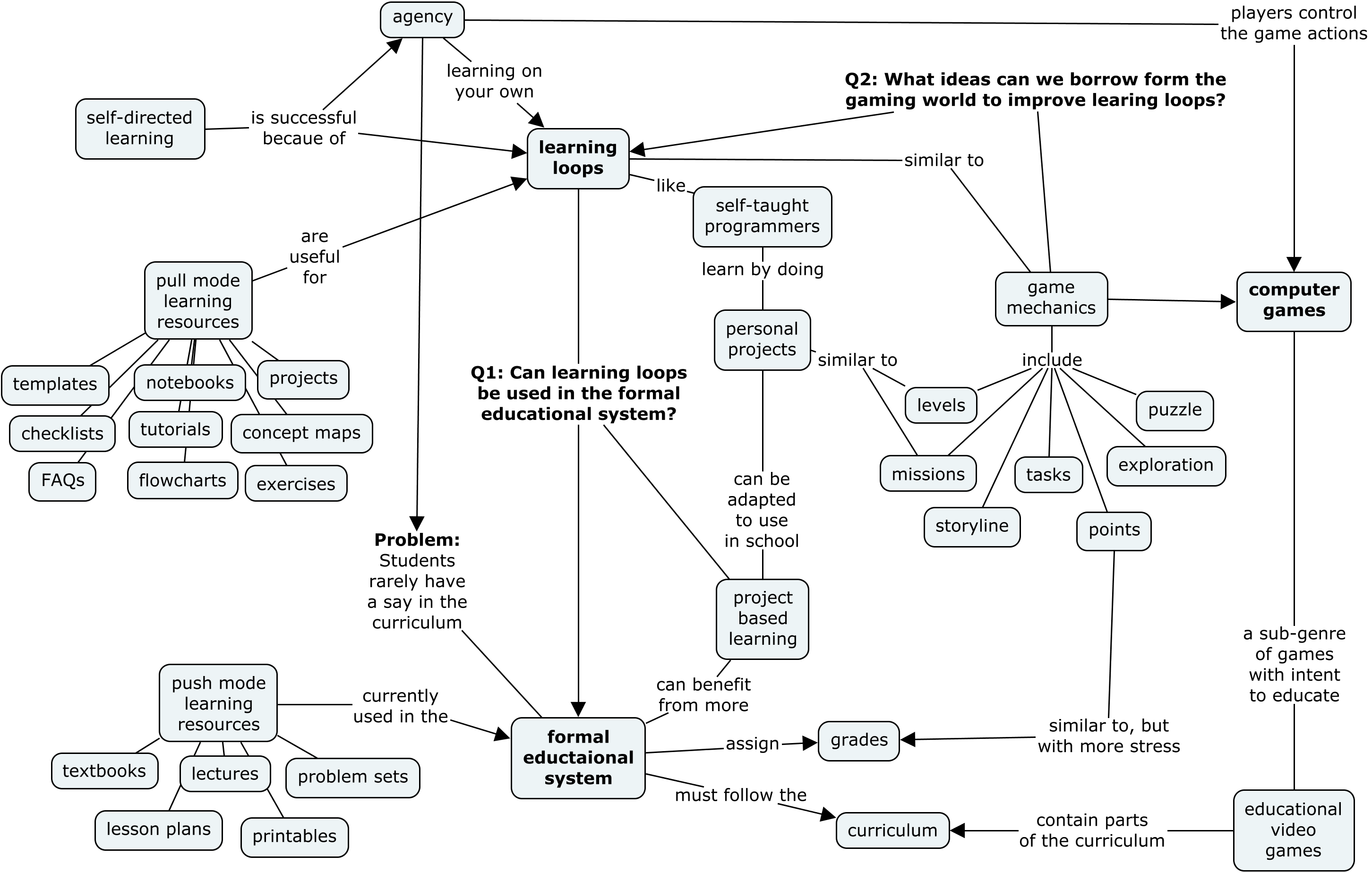
In this blog post, I want to look at the mechanics that make learning loops work and think about ways they could be used by teachers, private tutors, and publishers to build learning experiences in which learners have more agency and control over their learning. We’ll also look at the related phenomenon of game mechanics that exists in certain “addictive” computer games. Figure 1 contains a visual summary of the ideas we’ll discuss in this blog post. The two main questions we’re interested in are: “What can teachers within the formal educational system learn from autodidacts?” and “What can autodidacts learn from the gaming industry about staying motivated?”

In the second part of the blog post we’ll think about the role of teachers and educational resources in supporting and reinforcing learning loops. I’m writing this mostly as a self-reflection and welcome comments by other educators, content creators, and learning experience designers interested in this phenomenon.

Concept map illustrating the ideas discussed in the blog post: learning loops and their relation to game-loops and potential uses in the formal educational system.

Figure 1: The main question I’m interested in thinking about is how to introduce aspects of self-directed learning into the formal educational system, in order to give students more agency over their learning process.


Continue reading “Learning loops” →

No Bullshit Guide to Statistics progress update

Over the years several readers have suggested (sometimes demanded!) that I write a book on statistics. Indeed, since the company’s mission is to make the most useful parts of math accessible to the people, it makes sense to pursue statistics as the next title. Statistics is some of the most useful math out there! The 21st century is going to be all about data, so it makes sense to learn about the concepts and tools you need to analyze data, discover patterns, and make decisions.

I’ve now been working on the No Bullshit Guide to Statistics for three years so I figured it’s about time for an update to let y’all know how it’s going. My goals with this blog post are to share with you the detailed book outline and chapter previews, and also ask for your help to validate certain assumptions about the readers’ background (math and programming skills) and their motivation to learn statistics. Please jump to the short survey before continuing with the rest of the blog post. It won’t take longer than 2 mins.


Continue reading “No Bullshit Guide to Statistics progress update” →